cross-posting this thread i made here since it bears on [SICP project](https://discuss.criticalfallibilism.com/t/justin-does-sicp/96/40)
> **[Possible to specify/resize image size when publishing from Ulysses to Casper...](https://forum.ghost.org/t/possible-to-specify-resize-image-size-when-publishing-from-ulysses-to-casper-theme/22952)**
>
> Hi. I’m using Ulysses to write my blog posts. Ulysses lets you publish directly to Ghost. I’m using Casper. I don’t like the sizing of some of the images, however. Ulysses lets you specify the dimensions of images on the editor end, but this seems...
Some general categories of solutions I’ve thought of:
1. publish and then edit the html manually to resize images
2. make smaller versions of the images I want and replace current images with those
i don’t like these (too much work/burden)
---
> [@JustinCEO](#):
>
> Some general categories of solutions I’ve thought of:
>
> 1. publish and then edit the html manually to resize images
> 2. make smaller versions of the images I want and replace current images with those
Depending on how you include the images in Ulysses, you could try specifying them in html instead of markdown syntax. Markdown would be like ``. Equivalently you could do something like this directly in the .md file: `` – the value for the `width` parameter can have diff units depending on what you are after; I think maybe just pixels and percentages work in the html attribute, but you can use more units via css.
Examples:
```auto
```


If that doesn’t work, you could mb add some CSS classes to style them, like:
```css
img.w20 {
width: "20vw"; /* 20% width of the entire page */
}
```
(which you’d use like ``)
If those still don’t work (e.g. b/c you can’t use img tags directly or don’t know the URL of the image in advance), then there are more CSS tricks you can do, a few are mentioned in this article: [https://www.xaprb.com/blog/how-to-style-images-with-markdown/](https://www.xaprb.com/blog/how-to-style-images-with-markdown/).
The one’s that look good are “Use CSS And Special URL Parameters” where you refer to the image url like: `cat.png#magicstring` and have a css class like:
```css
img[src*="#magicstring"] { /* css pseudo-selector */
width: 20vw;
}
```
also wrapping it in a div (example directly from article)
```html
curiously, this is what the examples using the CF logo image look like in the post preview:

Also, IDK what markdown processor ghost uses (or if ulysses does it prior to upload) but there are lots of ‘proprietary’ extensions; like discourse has this for the screenshot above: ``
---
there’s some way to add css classes to stuff with markdown. i forget the syntax offhand. i think it depends on which specific markdown flavor you’re using. i don’t think it was in the original markdown spec. so you could probably figure out how to add image width stuff that way.
---
> [@Max](#):
>
> Depending on how you include the images in Ulysses, you could try specifying them in html instead of markdown syntax.
I paste images into Ulysses straight from the macOS clipboard. On my end in the Ulysses editor, they just appear as the actual image. The actual storage/organization of the images (as existing in some folder or file somewhere) isn’t exposed to the user. I assume they’re bundled together by Ulysses in some proprietary format or structure or whatever and then that ultimately gets translated into whatever final output you decide to publish too.
---
Since they just appear as images in Ulysses, I think I’m reliant on what Ulysses decides to expose for editing images through the interface - similar issue as with Ghost editor. Ulysses _does let you_ specify image dimensions, but those don’t seem to be working ☹
---
> [@Max](#):
>
> If those still don’t work (e.g. b/c you can’t use img tags directly or don’t know the URL of the image in advance), then there are more CSS tricks you can do, a few are mentioned in this article: [https://www.xaprb.com/blog/how-to-style-images-with-markdown/](https://www.xaprb.com/blog/how-to-style-images-with-markdown/).
gonna look at this thx
---
Apparently Ulysses has some support for specifying CSS classes: [Styles & Themes - HTML Styles](https://ulysses.app/styles/html-styles#lists)
IDK if those would get posted to ghost, but mb worth trying. Ulysses might also automatically add class names or other attributes to images – if so then you might be able to style them via like hijacking the css class / attrs with custom, additional CSS.
---
**Moderator Action Notice** : I broke these posts off and gave them their own topic cuz I decided they’re pretty distinct from the SICP stuff. Should have Replied as Linked Topic from the beginning probably.
Tangent: I was impressed by how easy Discourse made it to move the posts
---
Related to images, i edited `post-content` in the code on this page to `gh-content` and the it worked to auto-link images
> **[How to make all images in a Ghost post auto-link to themselves (to view at...](https://grantwinney.com/how-to-make-all-images-in-a-ghost-post-auto-link-to-themselves/)**
>
> When you insert an image into a post using the Ghost platform, it might be resized (depending on the theme you're using) to a significantly smaller size than its actual dimensions. Viewing the full version means either your visitor has to open the...
---
I’ve made significant progress on finding a solution.
I found a script that performs resizing based on the values you enter in a specified format in the alt text of an image.
I modified the script, which I found in this thread, to account for a change in the names of CSS classes in a recent update to the default Ghost theme.
> **[Image resizing and caption from ALT field](https://forum.ghost.org/t/image-resizing-and-caption-from-alt-field/15094)**
>
> Resizing Ghost blog image with MD and pick up the ALT of the image This is just a quick resizing code snippet if you are looking for something easy and basic function. These few lines gives a quick control on the image size in case you don’t want a...
So right now, this is the script I am using on my ghost site:
```auto
// Creates Captions from Alt tags
$(".gh-content img").each(
function() {
// Let's put a caption if there is one
var altImg = $(this).attr("alt")
if (altImg) {
var widthImg = "100%";
var matching = altImg.match('@(100|[1-9][0-9]?)\%$')
if (matching !== null){
widthImg = matching[1] + "%";
altImg = altImg.slice(0,matching.index);
}
$(this).css({"width":widthImg, "display": "block", "margin": "auto"});
$(this).wrap(
''
).after(
'' +
altImg +
''
);
}
});
```
The script works to resize images.
I’m having an issue trying to do the resizing on the Ulysses side.
So I think the script is intended to see stuff of the form “@X%” in the alt text of an image, where X is a value from 1 to 100, and then 1) perform a resizing of the image and 2) delete that “@X%” text from view
If I add alt text in the Ulysses editor, it just works as intended, no problem. Here is an example test page (which I intend to delete later) where the alt text I typed in the Ulysses editor is “test @50%”.
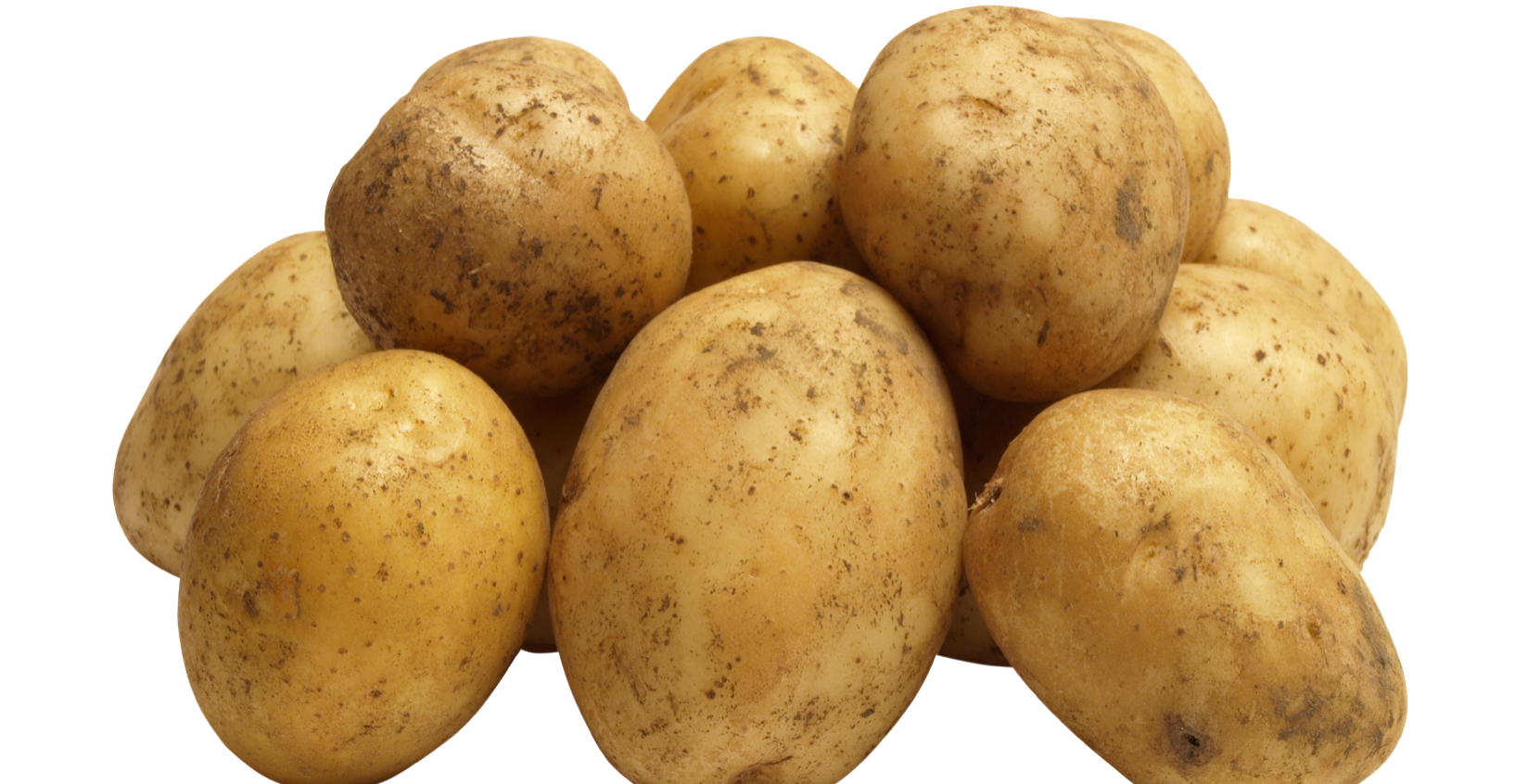
> **[potato test, labeled in the app](https://blog.justinmallone.com/p/2e06b226-9acc-4604-a68c-cb6620849619/)**
>
> A personal blog of serious efforts at learning and understanding.
But if I add, say, “test @50%” as text in a Caption of an image within the Ulysses editor, the image gets resized but I get this weirdness where there are two captions, one showing just the intended caption text, and one showing the entirety of “test @50%”:
> **[potato test, uploaded from ulysses](https://blog.justinmallone.com/p/35a2b178-dfeb-4c3c-8c43-5228b6bbedc3/)**
>
> test @50%
if I set “@50%” is the entirety of the caption in Ulysses, I only get one caption, but it says “@50%”
> **[potato test uploaded from ulysses, no caption text other than resize indicator](https://blog.justinmallone.com/p/8c0b03c4-4c66-43ed-a59b-1f65214aa3eb/)**
>
> @50%
I may have to be content with just doing the resizing with this method using the Ghost editor, but if any knows of an easy fix to the issue I’m having with using Ulysses offhand, let me know please 🙂
---
> [@JustinCEO](#):
>
> So I think the script is intended to see stuff of the form “@X%” in the alt text of an image, where X is a value from 1 to 100, and then 1) perform a resizing of the image and 2) delete that “@X%” text from view
Yup. WRT the `.match()` – that’s using regex and you can test patterns via [regexr.com](http://regexr.com) (I use this often when doing regex stuff). One thing that may be important, the `@xx%` has to be the last thing in the alt text.
Here’s a screenshot of me testing the regex you posted:
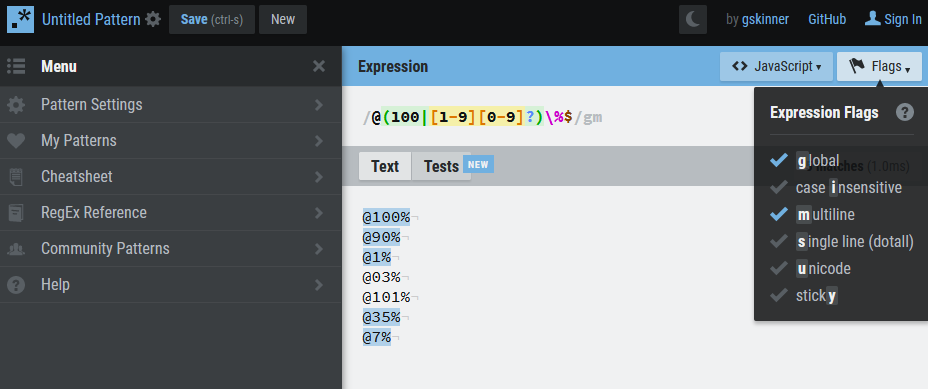
And here’s a sharable link to that pattern + tests: [https://regexr.com/5thjq](https://regexr.com/5thjq)
> [@JustinCEO](#):
>
> But if I add, say, “test @50%” as text in a Caption of an image within the Ulysses editor, the image gets resized but I get this weirdness where there are two captions, one showing just the intended caption text, and one showing the entirety of “test @50%”:
Looking at the raw source code of example 2 (with formatting):
```html
test @50%
```
This is the **raw** source code; it’s what exists before your JS runs. So you already have a `figcaption` element, but the script is adding a second one, which is why you’re getting 2 captions. Here’s what the code looks like (using ‘inspect element’) after the JS runs:
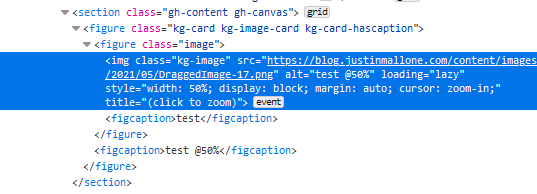
It’s a fairly simple fix IMO. I can give you more direction (or a soln) if you like, but here are some hints:
Consider testing the next sibling element after the `img` for whether it’s a `figcaption` or not. you can do this via the `.next()` method on the element returned (like `$(this).next()` I think). (there are also other neat helper methods to know about, like `.parent()` and `.children()`.)
> [@JustinCEO](#):
>
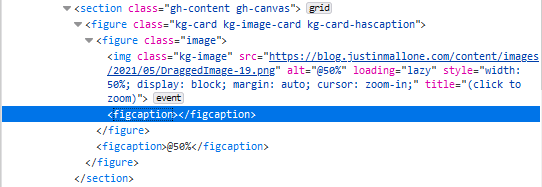
> if I set “@50%” is the entirety of the caption in Ulysses, I only get one caption, but it says “@50%”
You actually still get 2 captions (that’s expected b/c it’s the same bug), but one caption is empty. again via inspect element:
PS: GJ re finding a soln. You’re pretty close.
---
idk why you’re doing all that.
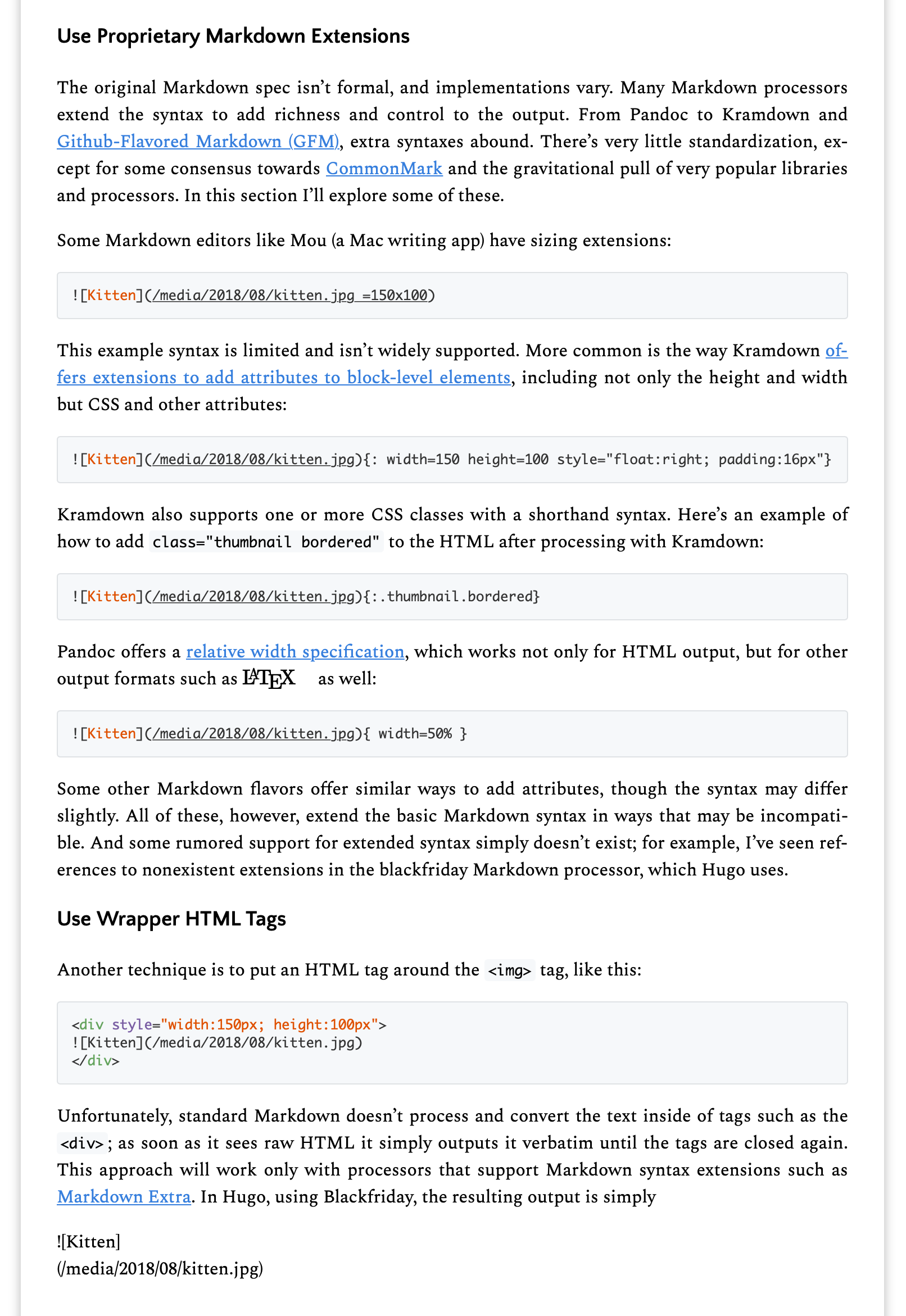
Max linked that. the first one is what i suggested. try that. if that doesn’t work, do the second one in the pic, which i’ve done before. (but probably give the div a css class instead of inline styling.)
---
> [@Elliot](#):
>
> Max linked that. the first one is what i suggested.
Sorry if I am confused. I appreciate the reply.
To clarify, do you mean you suggested the first one in the pic in your post?
Assuming so, my reply is that in Ulysses, I don’t get markdown for an image when I paste an image in, just the image itself, and in Ghost, I don’t get markdown for an image that has been uploaded, just an image card, so I’m not sure where I’d try adding the syntax for a proprietary extension in the workflow I want (which is to mostly do stuff in Ulysses and maybe touch up/quick pass in Ghost). Maybe if I was manually editing the page after it got created, I could see where to add `width=150` or whatever in whatever syntax somewhere, but in Ulysses and Ghost, I am not sure where that would go.
I was trying to find a way to use something that Ulysses did expose to me, which is why I was trying to figure out a way to use the caption field, which is something Ulysses actually does make available for me to edit.
---
> [@Elliot](#):
>
> Then do the second one? Put a div around the image with a css class. You can make several classes for different image sizes.
My understanding of CSS isn’t great so apologies in advance for any confusion.
So I think you’re suggesting I could have like, CSS classes for, for example, small, medium, and large images, and specify an image as being a member of one of those classes to resize it?
I think that’s the same basic idea that Max was talking about here with his `img.w20` example [Resizing images in Ghost/Ulysses - #2 by Max](https://discuss.criticalfallibilism.com/t/resizing-images-in-ghost-ulysses/142/2)
That could be fine (though I’d prefer to be able to specify stuff on an image by image basis if I want, but still, could be okay). But I’m not sure how I would specify a particular image’s class in Ulysses or Ghost when I want to resize it.
btw one of the suggestions in the “How to Style Images With Markdown” article is “Abuse Image Attributes As CSS Selector Targets”, which I think is what that script I pasted earlier is trying to accomplish. Specifically it’s relying on using (abusing?) the alt attribute.
---
> [@JustinCEO](#):
>
> So I think you’re suggesting I could have like, CSS classes for, for example, small, medium, and large images, and specify an image as being a member of one of those classes to resize it?
I think Elliot meant: If you wrap the image in a div (just put HTML directly inline in your md file) then you can either use a class like `
` or put styles directly in the div like `
`. (I realize the image is shown as an image and not HTML, just put the opening div tag above it and the closing div tag below it)
if you use classes, you could have 1 class or 500 depending. if you want to do it per-image then you can do inline styles like the second div example.
> [@JustinCEO](#):
>
> But I’m not sure how I would specify a particular image’s class in Ulysses or Ghost when I want to resize it.
You’d just put the div tag around it. here’s a mockup in mspaint (pretend I took a screenshot of ulysses)
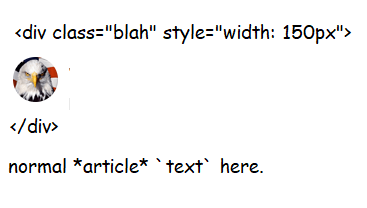
Granted, that might not work (could break when uploading to ghost or something), but that seems like a pretty easy way to do it. note: you can add css classes and inline styles at the same time, tho you don’t need to if you just want to set the width.
---
> [@Max](#):
>
> I think Elliot meant: If you wrap the image in a div (just put HTML directly inline in your md file) then you can either use a class like `
` or put styles directly in the div like `
` .
Oic. Thx. Yeah I tried using a div to style a single image in ulysses using the “raw source” syntax they have. It worked on the local preview of a ghost export on ulysses, but didn’t work on the live site. A few ulysses to ghost things seem broken. Maybe some other styling was overriding. I’ll investigate more tomorrow
---
So at the moment I’m just trying to test whether I can use divs to make style changes at all in the Ulysses to Ghost pipeline before I try to figure out a better/more organized way to handle changes I might want to make.
Here is what my Ulysses test document for exporting looks like on the editor end (the ~ is Ulysses syntax for raw source, meaning HTML or other such things)
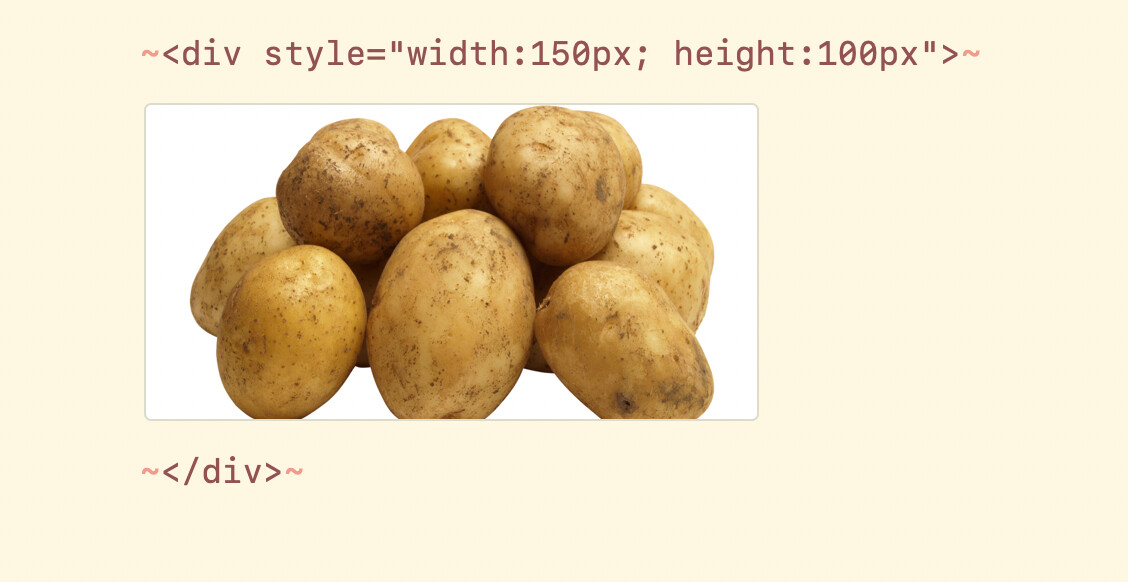
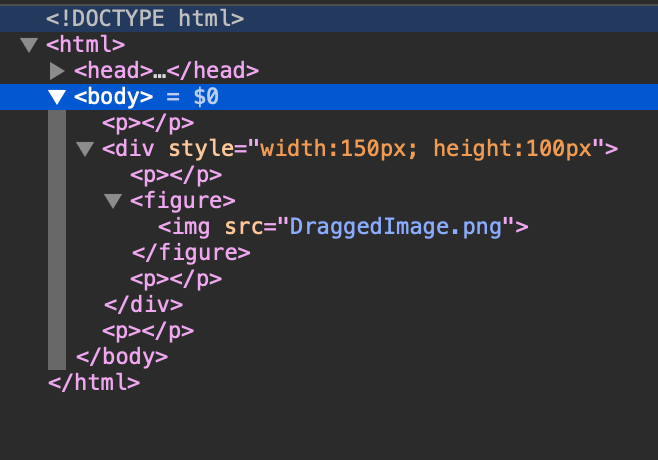
First, as a baseline, I exported to regular HTML, just to make sure I had the syntax right and that I could get it to be applied in any context.
This test was successful - the div shrink the size of the image. Here’s a screenshot of the HTML in the test document
It’s not operating as intended on the Ghost blog though.
> **[div test](https://blog.justinmallone.com/p/ffe69022-a391-49b2-8551-76a5935aafe0/)**
>
> A personal blog of serious efforts at learning and understanding.
in fact i’m not seeing “my” div showing up there at all. hmmph. is it getting filtered out somewhere?
---
o weird. can u get any raw html to work? what about html on its own line without the raw html markup?
[Next page](https://discuss.criticalfallibilism.com/t/resizing-images-in-ghost-ulysses/142.md?page=2)
 ` – the value for the `width` parameter can have diff units depending on what you are after; I think maybe just pixels and percentages work in the html attribute, but you can use more units via css.
Examples:
```auto
` – the value for the `width` parameter can have diff units depending on what you are after; I think maybe just pixels and percentages work in the html attribute, but you can use more units via css.
Examples:
```auto
